
Orufy Bookings QR Code—everything you need to know
Orufy Bookings QR Code: everything you should know
Handling events should feel easy, not complicated. Yet people often forget the booking link, struggle to find the right page, or leave the page before confirming their spot. This turns a simple booking process into a frustrating user experience. That's where a bookings QR code comes in.
Instead of asking people to save links or search emails, an instant scan takes them straight to your booking page. With Orufy Bookings, this process becomes even simpler, easier, and faster to share. Plus, a custom QR code is built into the Orufy Bookings mobile app—no third-party tools or QR generators required.
In this blog, we will walk through what the Orufy Bookings QR code is, how to use it, and how to get a QR code for an event.
Don’t have the Orufy Bookings app? Download It Now —Android and iOS.
What is the Orufy Bookings QR code?
The Orufy Bookings QR code is a scannable code for events or a booking page. When someone scans the QR code, they land on the main bookings page and can book the available events for the preferred time slot.
Think of It Like This: You have organized a workshop. People see your poster, scan the code, and book the event instantly. No hassle. No confusion. No lost links.
This QR code for bookings helps reduce cancellations and drop-offs, making scheduling accessible for everyone.
When to Use an Event QR Code?
An event QR code will work perfectly when you want people to book events or meetings instantly with no extra steps.
While sharing your booking link works well for synchronized scheduling, generating a QR code is the best way to schedule meetings at in-person events and workshops, when time is tight.
Below are some cases or meetings that require a QR code to book an event.
1. Customer Interviews
If you’re looking to call customers for their feedback, send them your customer QR code to meet them in person.
2. Follow-up meetings
Keep the momentum with a lead customer, prospect, or someone you are networking with. At the end of a fulfilling conversation, show them the QR code linking your One-On-One meeting on the booking page.
3. Sales Demos
While communicating with a qualified client, send them a QR code to book a meeting, showcasing your sales demos or demo sessions.
4. Coaching and consultation calls
If your business requires coaching sessions or consultation calls, you can send them QR codes to book meetings with you.
Introducing an event-based QR code for bookings maintains the focus on actions, not instructions.
Why Is It Effective?
-
People can scan QR codes to book meetings, sessions, or appointments instantly.
-
An effortless booking flow for attendees with fewer steps and proper booking confirmation.
-
Easily accessible on mobile devices, making bookings convenient for everyone.
-
The QR codes directly take the users to the booking page, preventing confusion.
-
Leads to quicker and faster decision-making, as users can book immediately when their interest is high.
How to Get a QR Code for an Event in Orufy Bookings?
Getting an Ourfy Bookings QR code is super easy. And if you already have the Orufy Bookings mobile app.
You are ready to get started!
Step 1: Download the Orufy Bookings mobile app for Android and iOS.
Step 2: Open the app and head to your Event Types
Step 3: Select an Event Type
Step 4: Click on the Share icon
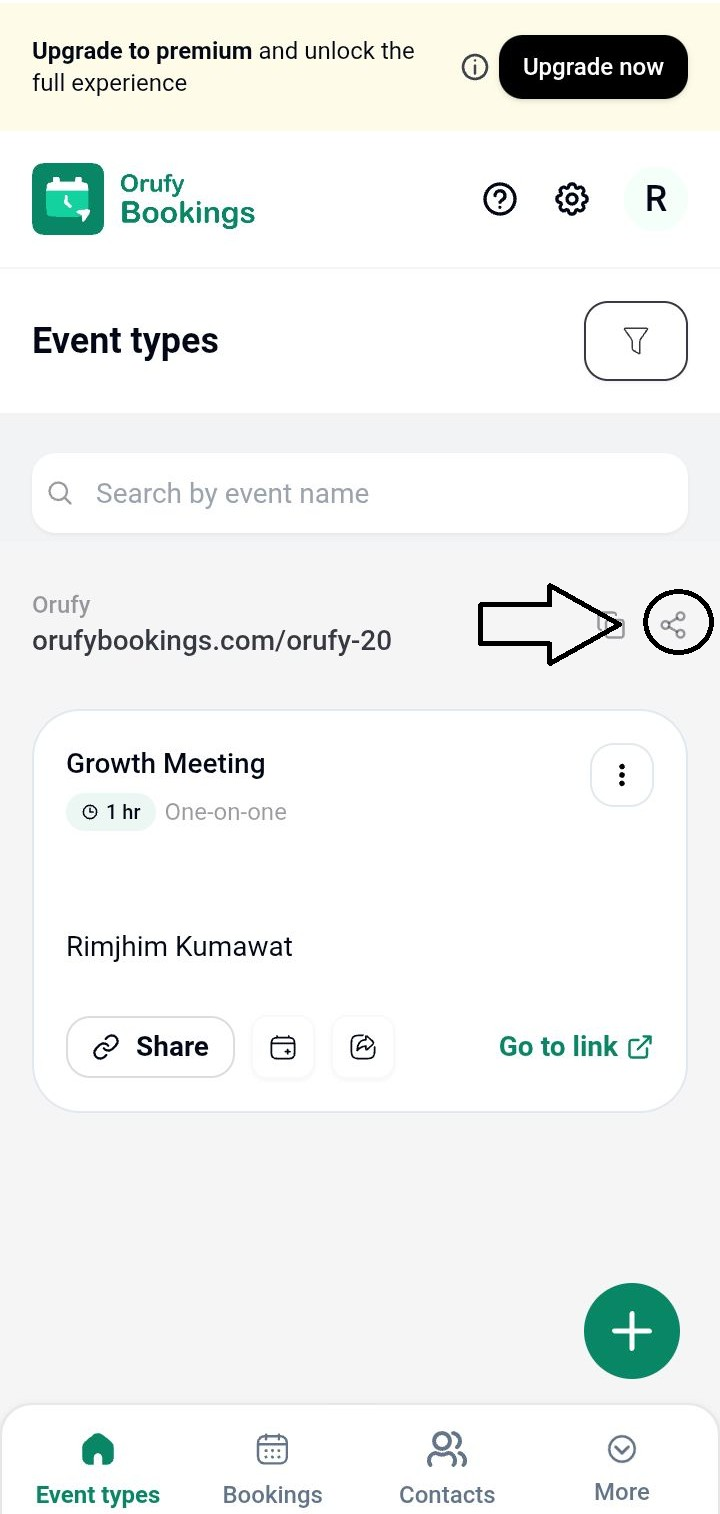
Step 5: You will get two options
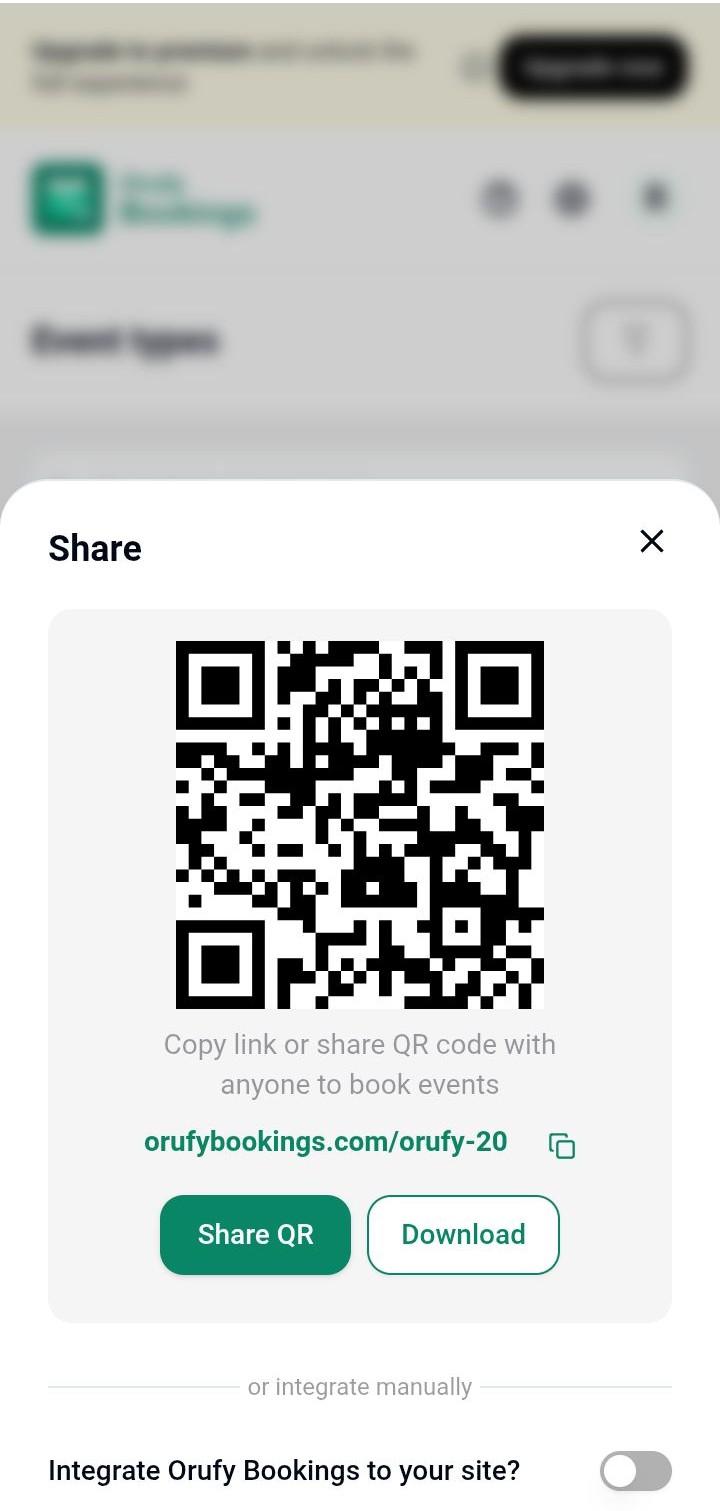
Share the QR code
It allows you to share the QR code from your mobile device to all platforms.
Download the QR code
It allows you to download the QR code image to be visible in your phone’s gallery.
Pro Tip: In addition to downloading the Orufy Bookings mobile app, make sure to connect your Google Calendar, Outlook Calendar, or Microsoft Teams to your account before the event.
So when you send your QR code to people, the booking page can showcase your real-time availability.
These automatic QR codes for events save time and remove uncertainty from scheduling.
Get Your QR Code Now
A booking QR code transforms event scheduling into a seamless experience. With the Orufy Bookings QR code, people scan, book, and confirm the meeting with no extra effort.
If you want a simplified way to manage events and reduce booking friction.
Start using QR code for bookings and make events easily scannable.
Similar Blogs


