
Link Handling
There are a number of links inside that lead users to a specific path. The process is called “Link Handling,” which decides how an app behaves when users click on these links. It controls where these links are opening, inside the app, or redirecting to a browser.
For example, you are purchasing a product and tap on the product link, it directly takes you to the product page inside the app; that is how link handling works.
Workflow of Link Handling
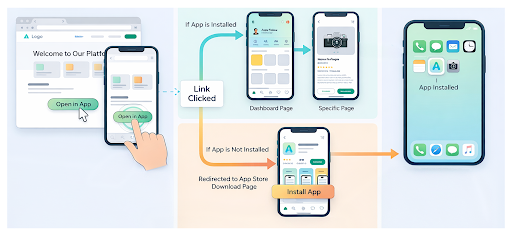
See, what happens when a user taps on a link:
-
System checks if the app is installed
-
If yes - opens the app directly
-
After that - routes to a specific page or screen (if configured)
-
If not - opens app store or browser
Types of Link Handling
Deep Linking
Opens a specific page within the app. For Example, a link directly opens the product, article, or profile.
Apps Links/ Universal Links
These are smart links that directly open the app if installed. If it does not, then it opens the same content in the browser.
Deferred Links
Works no matter if the app is not installed. It installs the app first and directs users to the right screen.
Internal and External Links
The two main categories of links are internal and external, which either take users within the app or outside.
Why Link Handling is Important?
The link handling not only helps in navigation faster, but more meaningful, like:
Better User Experience: The users land where they actually expect.
Increase Conversion: Giving direct links in the app encourages users to take actions, such as buy, sign, etc.
Easy Start: Guide users through the app step-by-step
Stronger Reach: Makes your campaigns more effective, like ads, emails, and social posts, and more.
Important Things to Consider
-
Always link to a specific page of the app, not just a homepage
-
Ensure your fallback options work properly (browser or app store)
-
Check consistency of the links across platforms (Android & iOS)
-
Test the links on a regular basis to prevent incorrect or broken links


